NEA Environmental Sanitation regime
The records system for NEA's Environmental Sanitation regime.
Keep every record NEA's Code of Practice requires in one place. Print a signed pack when NEA audits. For premises managers and their Environmental Control Coordinators (ECCs).

Who keeps the records
NEA regulates 28 types of premises and 161 named shopping malls. The premises manager is responsible for the records, not the cleaning contractor.
What the records system gives you
Ready for an audit
A signed pack for any month, printed when NEA asks.
Saves your ECC time
Your ECC stops filling in a logbook and compiling folders for audits.
Your contractor's records
We connect your contractor's system free, if it gives data access.
Every site in view
Head office sees which sites have signed this month's records.
Premises the regime covers
- Shopping malls
- Coffeeshops
- Food courts and canteens
- Food centres and markets
- Preschools
- Schools
- Student care centres
- Eldercare facilities
- Social service facilities
The Code of Practice
The seven records NEA requires.
The Code of Practice lists the records you must keep on site and show on request. Fines are up to S$5,000, and S$10,000 for a repeat offence. CleanLog keeps all seven.
Daily cleaning records for each area
At the frequencies in your ES programme.
Cleaners record each area in CleanLog, or we import the records each day from your contractor's system.
Daily inspection of 10% of areas
Every area inspected within two weeks.
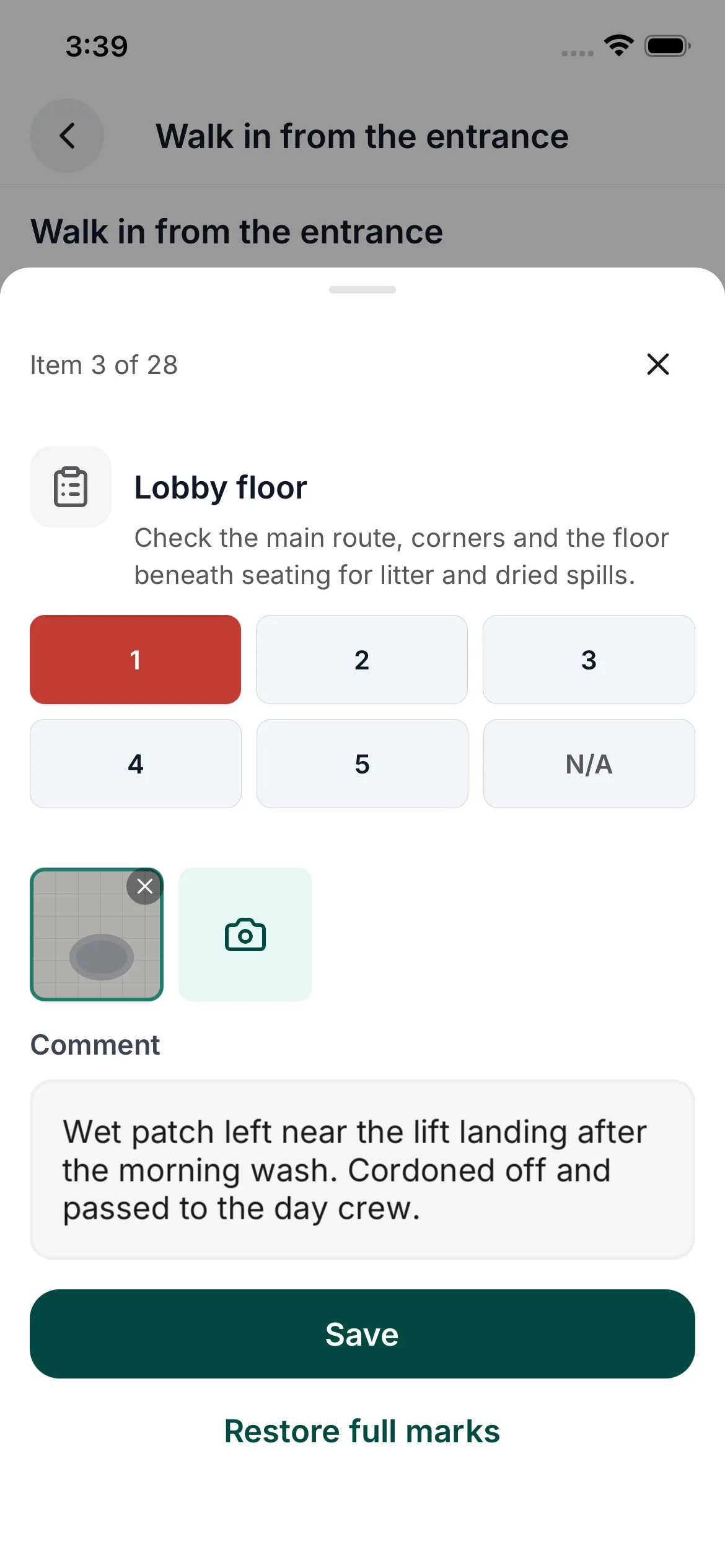
Your ECC inspects on a phone and scores the areas visited that day. The pack shows which areas were inspected on each day.
Photos before and after thorough periodic cleaning
Time-stamped. Every six months, or every three months for food premises.
Photos taken in CleanLog are stamped with the site, area, person, date and time. They sit beside the cleaning record in the pack.
Areas of concern and follow-up
What was found, what was done, and when.
A failed check opens a work order. It closes when the work is done and the area is inspected again.
Pest survey every six months
By an NEA-registered pest control operator.
File each survey with the operator's report attached. A schedule shows when the next survey is due.
Signed declaration by your ECC
With name and registration number.
Your ECC signs each month's records on screen. Once signed, that month's records are locked.
ES programme, cleaning procedure and contracts
Current copies, kept on site.
Store them with the site's records. They are included when you download the pack.
CleanLog keeps the records. Compliance remains the premises manager's responsibility, and NEA's auditors decide whether the standards are met.
Why CleanLog
Why not paper, or a checklist app?
Paper is legal, and NEA's templates are free. For one small site they can be enough. They stop working when the records come from more than one place.
| The job | Paper and templates | A checklist app | CleanLog |
|---|---|---|---|
| Photos before and after periodic cleaning | Kept on a phone, apart from the record. | Attached to an inspection. | Stamped with the site, area, person, date and time, and filed with the record. |
| Your contractor's cleaning records | A separate report, filed by hand. | Only what your own staff enter. | Imported each day from the contractor's system. We build the connection at no charge. |
| Areas of concern and follow-up | Written up afterwards. | A note on the inspection. | A work order that closes when the area is inspected again. |
| Which areas were inspected each day | Ticked on a paper grid. | A separate report for each inspection. | One grid for the month, filled in from each inspection. |
| Several sites | A folder at each site. | A report for each site. | One screen showing which sites have signed this month. |
| The pack for an auditor | Assembled from folders. | Exported one inspection at a time. | One signed PDF for the month, quarter or year, with the photos and reports in the same download. |
01 · Set up
Set up from the ES programme you filed.
Send us the ES programme you submitted to NEA. We set up its areas and cleaning frequencies with you.
- Areas
- The same areas listed in your ES programme.
- Frequencies
- Routine cleaning, periodic cleaning and inspections, at the frequencies you declared.
- Cleaners
- In-house cleaners, a contractor, or both. No charge per user.
- Contractor's system
- We connect the system your contractor uses at no charge, if it gives access to its data. Or your contractor uses CleanLog for your site.
- More sites
- Each site gets its own ES programme, set up the same way.
02 · Records
Use the records your contractor already keeps.
Cleaning records are imported from your contractor's system each day, so nobody keeps a second logbook. Your ECC adds the daily inspections.
- Cleaning records
- Imported each day from your contractor's system, or recorded in CleanLog.
- Inspections
- Your ECC scores each check on a phone and signs.
- Photos
- Stamped with the site, area, person, date and time.
- Follow-up
- A failed check becomes a work order with a due date.
03 · Pack
Give NEA's auditor one signed pack.
Print the records for any period when NEA asks. Send the same pack to head office each month.
- Period
- By month, quarter or year.
- Signed
- By your ECC, with name and registration number.
- Format
- A signed PDF to print and keep on site. The original photos and reports come in the same download.
- Retention
- Records are kept until the end of the next calendar year, as NEA requires.
Several sites
Managing several sites? See which have signed.
One screen lists every site's records for the period, so head office sees which packs are signed and which are still open.
Questions
Questions about the Environmental Sanitation regime.
What is the Environmental Sanitation regime?
Who is responsible: the premises or the cleaning contractor?
Does our contractor have to change systems?
Does NEA accept digital records?
What if our own staff do the cleaning?
How much does it cost?
Start with one site.
Send us one site's ES programme. We set it up with you and run the first month, so you see a signed pack before deciding on your other sites.