Evidence
Every completed job leaves a record.
Keep inspections, forms, and photos with the work they document. Give managers the time, place, and result they need to review a job.
- Time and place
- Photos and scores
- Linked follow-up work
The work
When a client asks about a job, you need more than a message saying it is done. CleanLog keeps inspection scores, photos, notes, and follow-up work together. Capture the details on site, review the result, and use the records in your reports. See inspection software with scoring and signatures.
01 · Capture
Keep proof with the work.
Record who was there, what was done, and what the inspection found. Keep the details ready for review.
- Attendance verified
- The shift records who was there, where, and when.
- Work order completed
- Keep the work instructions, response time, and photos with the job.
- Inspection recorded
- Save scores and notes, and link failed items to follow-up work.
- Ready for review
- Managers and clients can check the result and its supporting records.
02 · Review
Show clients what happened.
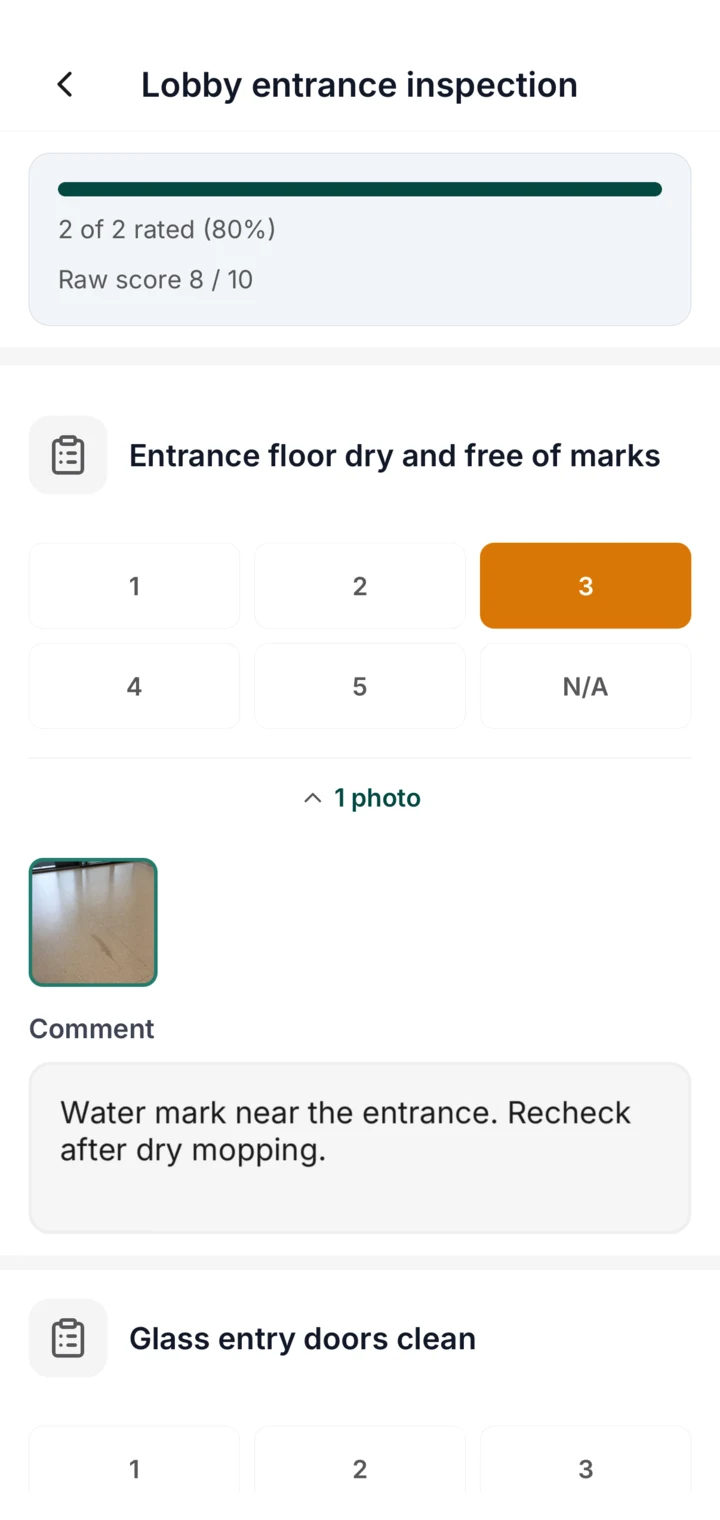
Open the inspection to see the scores, photos, notes, and any follow-up work.
- Inspection
- Each item keeps its score, photo, and note, so the result and the reason sit together.
- Forms
- Toolbox talks, safety checks, and handovers are recorded where the work happens, with time and location attached.
- Follow-up work
- An inspection can create a follow-up work order carrying its failed items. The fix links back to the inspection that raised it.

03 · Report
Make monthly reporting less work.
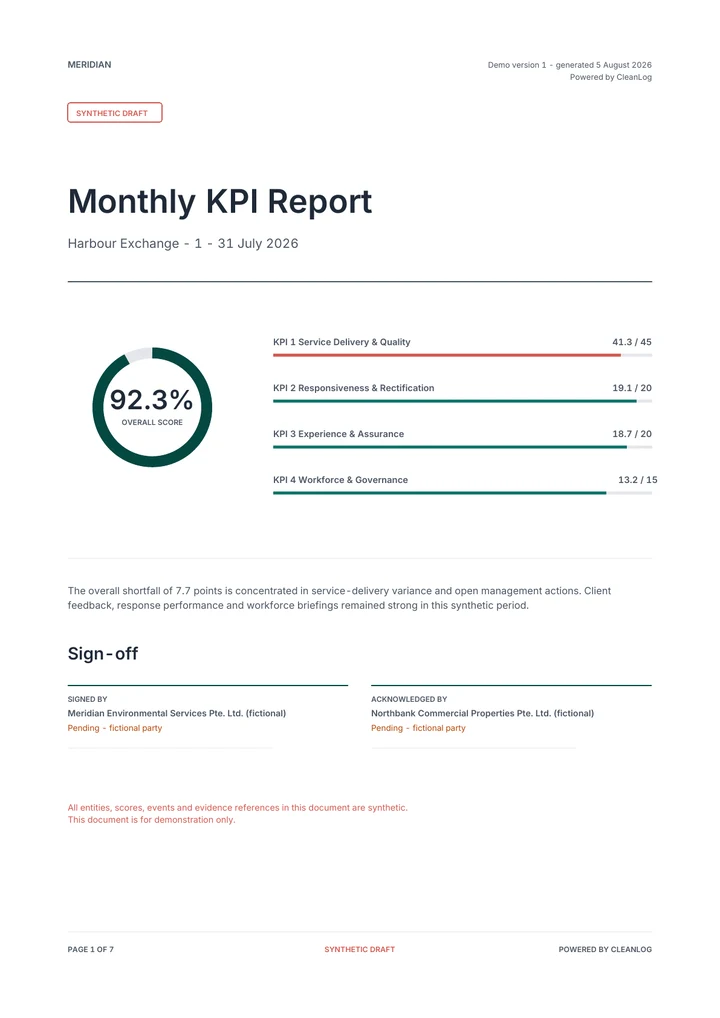
Put the evidence your team already captures to work in your reports. Track trends and support your contract KPIs without gathering the same records again.
- Analytics
- Compare pass rates, response times, and open work across locations.
- Compliance
- Turn accepted evidence into the monthly scorecard your contract expects.
Verified evidence
Everything in Evidence
Inspection checklists
Score the work and create follow-up work orders for failed items.
Inspection checklists
Score the work and create follow-up work orders for failed items.
How are inspections different from task checklists?
Task checklists guide cleaners through what to do. Inspection checklists let someone evaluate the result. Items can be yes/no, scored 1 to 5, or scored on your own custom scale, with an N/A option.
Can I customise how inspections are scored?
Yes. Choose the score options, item weights, and pass mark. Show results as points or percentages, with labels such as Pass/Fail or your contract's grades.
Can inspections be scheduled?
Yes. Schedule inspections at the frequency your contract requires: daily, weekly, or monthly. Inspectors get notified when an inspection is due.
Who can run an inspection?
Supervisors, managers, or clients. Anyone with inspection access can complete a checklist on the mobile app or client portal.
What happens when an inspection item fails?
Create a work order from the failed items in one step. It links back to the inspection, so the fix is tracked and closed like any other work order.
Can clients see inspection results?
Yes. Completed inspections, scores, and photos appear in the client portal and the client app. Clients can check the work without asking for a report.
Can we capture video as well as photos?
Yes. Turn on video evidence in Settings and pick a clip length of 15, 30, or 60 seconds. A short clip shows a leak, a spill, or a finished area better than a still, and it uploads quickly from site. Capture video on inspections and work orders from the mobile app.
Can inspection results be changed afterwards?
Only on the record. A manager can correct an item on a completed inspection, but must give a reason. CleanLog keeps the old and new answer, the score before and after, who made the change, and when. The history stays with the inspection, so a corrected result is never mistaken for the original.
Can clients create work requests?
Yes. Clients can submit a service request and track its status through the mobile app or client portal. Every request enters the same work-order queue as internally created work.
Evidence forms
Record toolbox talks, safety checks, and site handovers.
Evidence forms
Record toolbox talks, safety checks, and site handovers.
What can I collect with forms?
Build reusable forms for toolbox meetings, safety checks, incident details, handovers, and other records your operation or contract requires.
Who can submit a form?
Publish forms to all locations or selected locations, then let permitted staff complete them from the mobile app. Submissions stay attached to the location, submitter, and time.
Can a form feed a contract KPI?
Yes. Accepted form submissions count as evidence for a configured contract KPI, alongside inspections, work orders, attendance, and supported connected data.
Can a submitted form be edited?
No. Once a form is submitted, its answers, attachments, submitter, and time are fixed. Managers review it, but nobody can rewrite it. That is what makes a form usable as evidence months later.
Connected evidence
Review supported sensor and robot data alongside your team's records.
Connected evidence
Review supported sensor and robot data alongside your team's records.
What device data can I use as evidence?
With CleanLog Connect, supported sensor readings, completed robot runs, and alerts that a robot needs help sit alongside inspections, work orders, forms, and attendance.
What if my sensor or robot is not listed?
Browse the maker index on the Connect page. If yours is not there, tell us the maker and model. Compatible devices that share data are added for free, and robot integrations are built on request.
Make the next client review easier.
Show us what your sites capture today. See how CleanLog keeps those records ready to review.