Operations
Keep your cleaning operation on track.
Plan shifts, verify attendance, and give every job the right instructions. Your team sees what to do. You see where help is needed.
- Shift scheduling
- Attendance review
- Work instructions
The work
Planning shifts, checking attendance, and assigning jobs is harder when each lives in a different tool. CleanLog brings the daily work into one place. Plan the week, give staff clear instructions, and review what needs attention.
01 · Schedule
Plan once. Run every week.
Build recurring shifts by member or location. See gaps in the week and assign coverage before the shift starts.
- One week view
- See scheduled, completed, draft, and cancelled shifts together. Spot gaps before the day starts.
- By member or location
- Switch the week between people and sites.
- Fill open shifts
- Assign a team member, or let staff request an open shift for you to approve.

02 · Attendance
See who arrived, from any site.
Compare scheduled shifts with clock-in records. Review late arrivals and missing clock-outs before exporting timesheets.
- Tracking
- Clock in by GPS or QR code at the site.
- Export
- Review and approve the hours, then export a CSV. Payroll runs in the system you already use.

03 · Work orders
Give every job a clear next step.
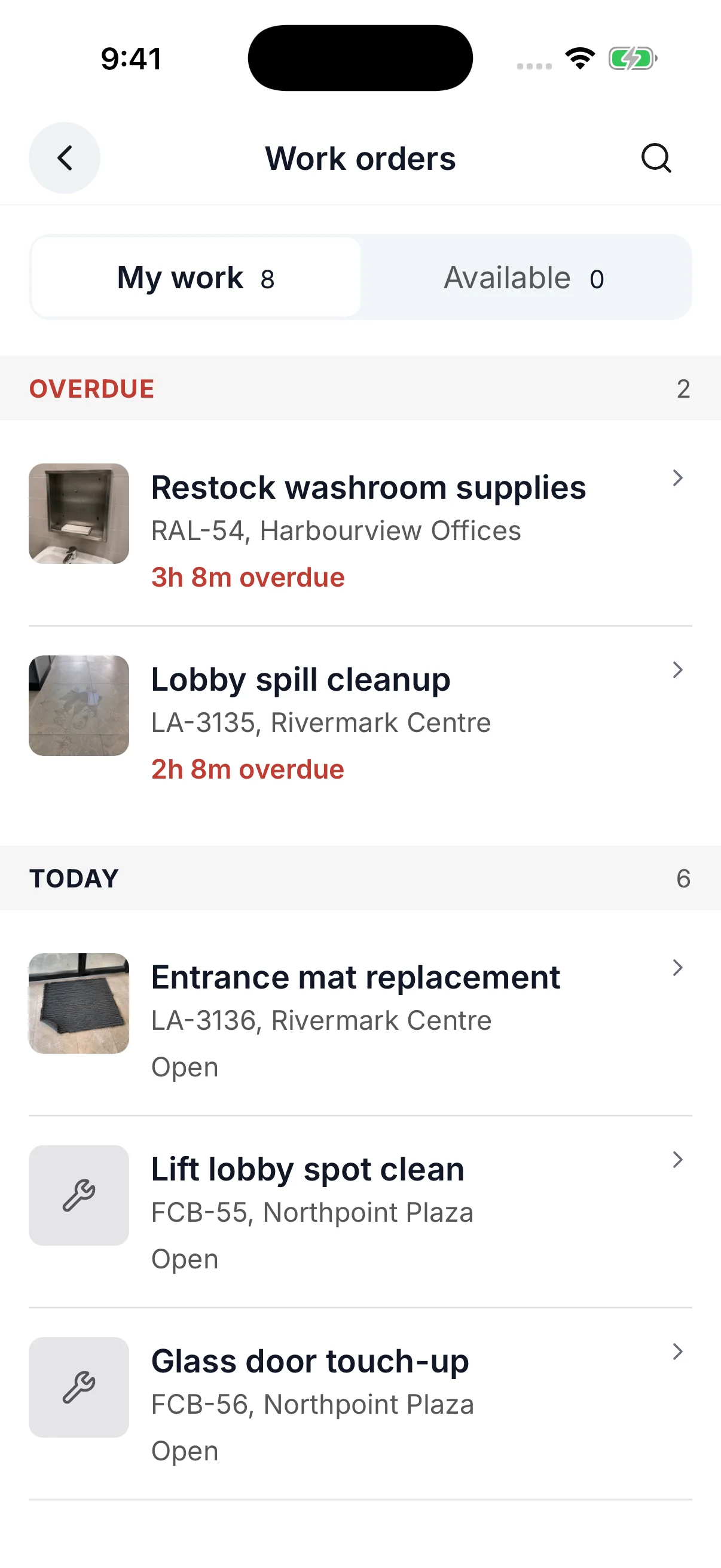
Staff see planned work, new requests, and inspection follow-ups on mobile. Instructions, checklists, and proof stay with the job.
- Ad-hoc
- Respond to what changed on site, including a failed inspection.
- Planned
- Work scheduled for a date.
- Periodic
- Schedule cleaning jobs that repeat regularly.
04 · Reviews
Find the work that needs attention.
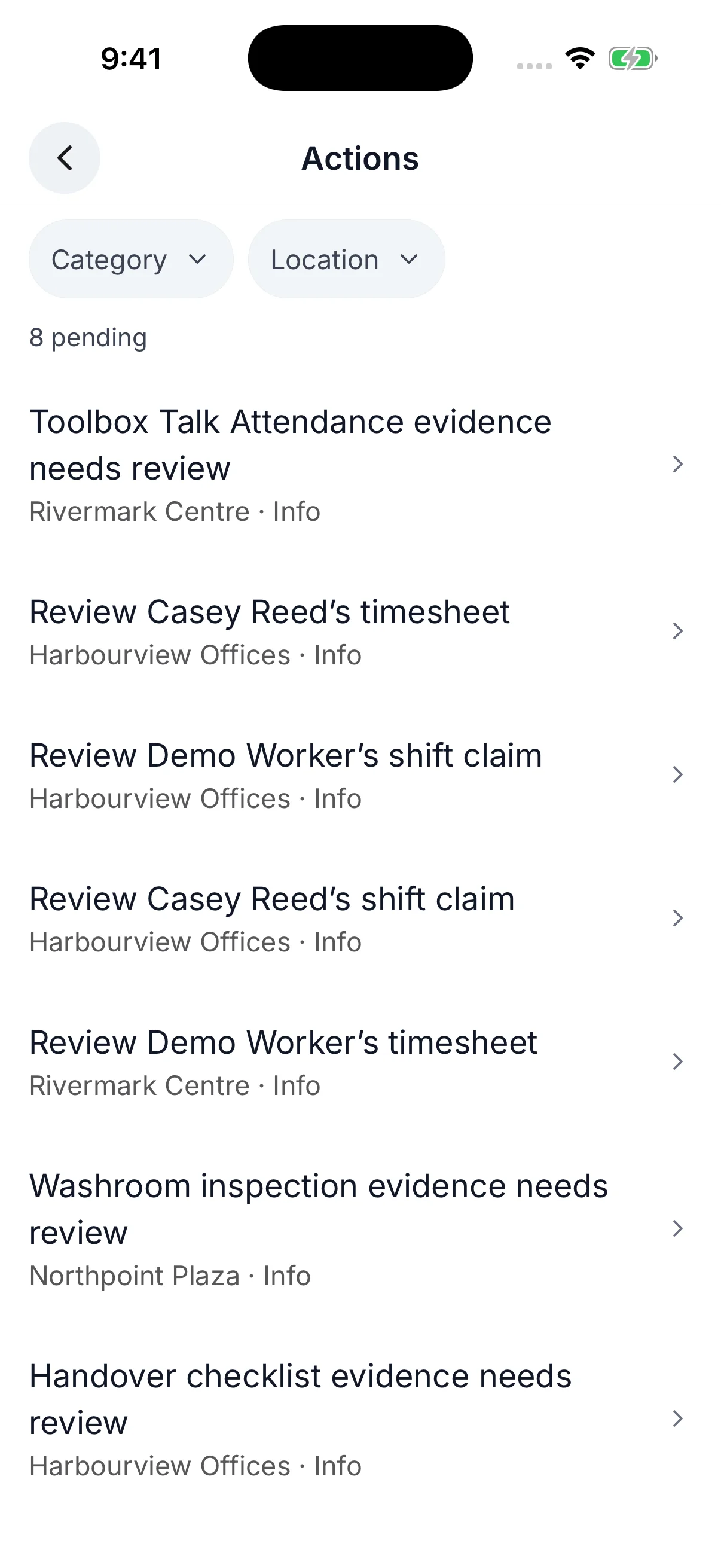
Review shift claims, timesheets, and forms in one Actions list. Filter by category or location to find what needs your approval.
- Shift claims
- Review staff requests to take an open shift.
- Timesheet reviews
- Check attendance records before approving the hours.
- Form reviews
- Open submitted evidence and decide what happens next.
Cleaning operations
Everything in Operations
Recurring schedules
Plan shifts once and repeat them each week.
Recurring schedules
Plan shifts once and repeat them each week.
How does scheduling work?
Create a weekly schedule, assign cleaners, and set it to repeat. Adjust shifts when plans change. Cleaners see their upcoming shifts in the mobile app.
What happens when a cleaner calls in sick?
Open the shift and see who is available to cover it, then reassign it. The replacement gets a push notification with the shift details.
How quickly can a new location go live?
Timing depends on the site's schedule, team, checklists, and data quality. Import the location and cleaners, set recurring schedules, assign shifts, and verify the first site before rolling out the rest.
Attendance tracking
Know who's on site without chasing updates.
Attendance tracking
Know who's on site without chasing updates.
How do workers clock in?
From the mobile app, by GPS or by scanning a QR code at the site. CleanLog records the time and the method used. Clock-ins made without signal upload when the phone reconnects.
How is the clock-in location checked?
GPS compares the phone's position with the site. A QR code scan shows the person was at the code. Each timesheet records how the clock-in was made, and managers review the records before approval.
What if someone forgets to clock out?
CleanLog flags the timesheet for review, and can clock the person out automatically after a grace period you set. A flagged timesheet cannot be approved or exported until a manager fixes it.
Can approved timesheets be changed later?
Not while the pay period is locked. Lock a period after review and nobody can edit or approve the timesheets inside it. Unlock it if you need to make a correction.
Does CleanLog handle overtime, breaks, and travel time?
Yes. Set one overtime policy for the account, daily or weekly, and CleanLog adds up hours across every site a person works. Break rules are set per location. Travel time is one account policy.
Does CleanLog replace my payroll provider?
No. CleanLog validates time records and exports a CSV your provider imports, clean enough to run payroll from. It does not process payroll, calculate taxes, or handle direct deposit.
Can managers see attendance in real time?
Yes. The web dashboard shows real-time clock-in status across all locations. No phone calls needed.
Work orders
Manage new requests, scheduled jobs, and recurring work in one list.
Work orders
Manage new requests, scheduled jobs, and recurring work in one list.
How are work orders created?
Managers can schedule periodic work or create an ad-hoc order. Clients can submit service requests, failed inspections can create remediation work, and supported Connect signals can open an intervention with its location and priority attached.
Can each work order carry an SOP?
Yes. Attach a standard operating procedure (SOP), checklist, and photos. Set the priority and service deadline (SLA). Staff follow the instructions on mobile and record completion on the same work order.
Can I track how long work orders take?
Yes. Every work order is timestamped from creation through completion and carries one service deadline (SLA), set by its location and priority. Managers see its status, age, owner, evidence, and whether it met the deadline.
Who can create a work order?
Supervisors, managers, admins, and clients can create work orders at the locations they can access. Cleaners see and complete the work assigned to them but do not create work orders.
Work instructions and checklists
Attach the right procedure to recurring or ad-hoc work.
Work instructions and checklists
Attach the right procedure to recurring or ad-hoc work.
How do SOP checklists work?
Create reusable procedures and attach them to scheduled tasks or work orders. A restroom clean can carry one checklist while a lobby clean carries another, so staff see the right steps for the job in front of them.
Can cleaners upload photos?
Yes. Cleaners can attach photos to any checklist item as proof of completion. Each photo is stamped with the time, the site and checkpoint, and who took it.
Are checklists required?
No. Add an SOP when the work needs a defined procedure or documented proof. Leave it off for straightforward work that only needs assignment and completion status.
Can the same location have different checklists?
Yes. SOPs attach to the work, not the location. The same building can use different procedures for restrooms, lobbies, kitchens, periodic work, and incident response.
Assets and supplies
Track equipment, supply levels, and refill requests at each site.
Assets and supplies
Track equipment, supply levels, and refill requests at each site.
Does CleanLog include asset and supply management?
Yes. Register equipment at each site with its status, photo, and QR code. Track supply quantities and let staff request refills. Managers record the refill when it is done.
Does CleanLog reorder supplies automatically?
No. Managers see quantities and refill requests per location and restock through their own supplier process. CleanLog records the request and the refill so the trail stays with the site.
Mobile app
Manage shifts, inspections, and work orders on site.
Mobile app
Manage shifts, inspections, and work orders on site.
Is there a mobile app?
Yes. iOS and Android. Supervisors run inspections, capture evidence, and track work orders. Cleaners who use the app get schedules, GPS or QR clock-in, and checklists. Teams whose cleaners don't carry smartphones run capture through supervisors instead. Clients use it to create service requests and track resolution.
Do cleaners need training to use the app?
Cleaners see their upcoming shifts, tap to clock in, and follow the checklist. Before rollout, walk the team through sign-in, clock-in, and the checklist used at their site.
What can managers and supervisors do on the app?
Communicate with the team, run inspections, track work orders, and monitor attendance. Scheduling and payroll export are handled on the web dashboard.
Do clients use the same app?
Yes. Clients see their locations, completed inspections with scores and photos, and open work orders with their status. They can submit service requests and message your managers and supervisors. Internal data such as labour costs, overtime, and team communications stays private.
Does the app work without signal?
Yes. Cleaners can clock in and out, work through their queue, and take photos without a connection. The records upload when the phone is back online.
Which languages does the app support?
English, Chinese, Malay, and Spanish. Each person picks their language in the app, and it follows the phone's language until they do.
Cleo AI assistantBeta
Spend less time finding answers and updating schedules.
Cleo AI assistantBeta
Spend less time finding answers and updating schedules.
What can I ask Cleo?
Ask who is working today, how overtime is looking, or which sites have overdue work orders. Cleo checks your live data and answers in plain language.
Can Cleo create shifts and make changes?
Yes. Tell Cleo what you need: 'Create a shift at Downtown Office, Saturday 8AM-12PM with Sofia.' It previews the change as a confirmation card. You review the details and confirm with one click. Nothing executes until you approve.
Can Cleo update several records at once?
Yes. Ask it to reschedule shifts or reassign work. Cleo shows the affected records and any changes it cannot make. You review the preview and approve the valid changes.
Can Cleo help set up new accounts?
Yes. Cleo guides you through account setup conversationally: company details, locations, team members, schedules, and checklists. Import locations and staff from a CSV or XLSX file instead of entering them one by one.
Does Cleo make changes on its own?
No. Cleo is read-only until you confirm. It proposes, you review, you approve. Every action is logged with a full audit trail.
Is Cleo included?
Yes. Cleo, the CleanLog AI assistant (Beta), is included in the Operations & Evidence plan. Trial and self-serve accounts have a fair-use limit for normal day-to-day operations. If your team leans on it heavily, talk to us about a higher limit.
See how your next week could run.
Walk through scheduling, attendance, and work orders with your sites in mind.