Analytics
See every location. Know where to act.
Compare attendance, work orders, and inspection results across your sites. Find what needs attention and open the records behind it.
- Compare locations
- Track changes over time
- Keep control of your data
The work
Which sites need attention? Are results improving? CleanLog helps you answer these questions using the records your teams already capture. Compare sites, check the work behind a result, and export the data you need.
01 · Compare
See what is improving and what is not.
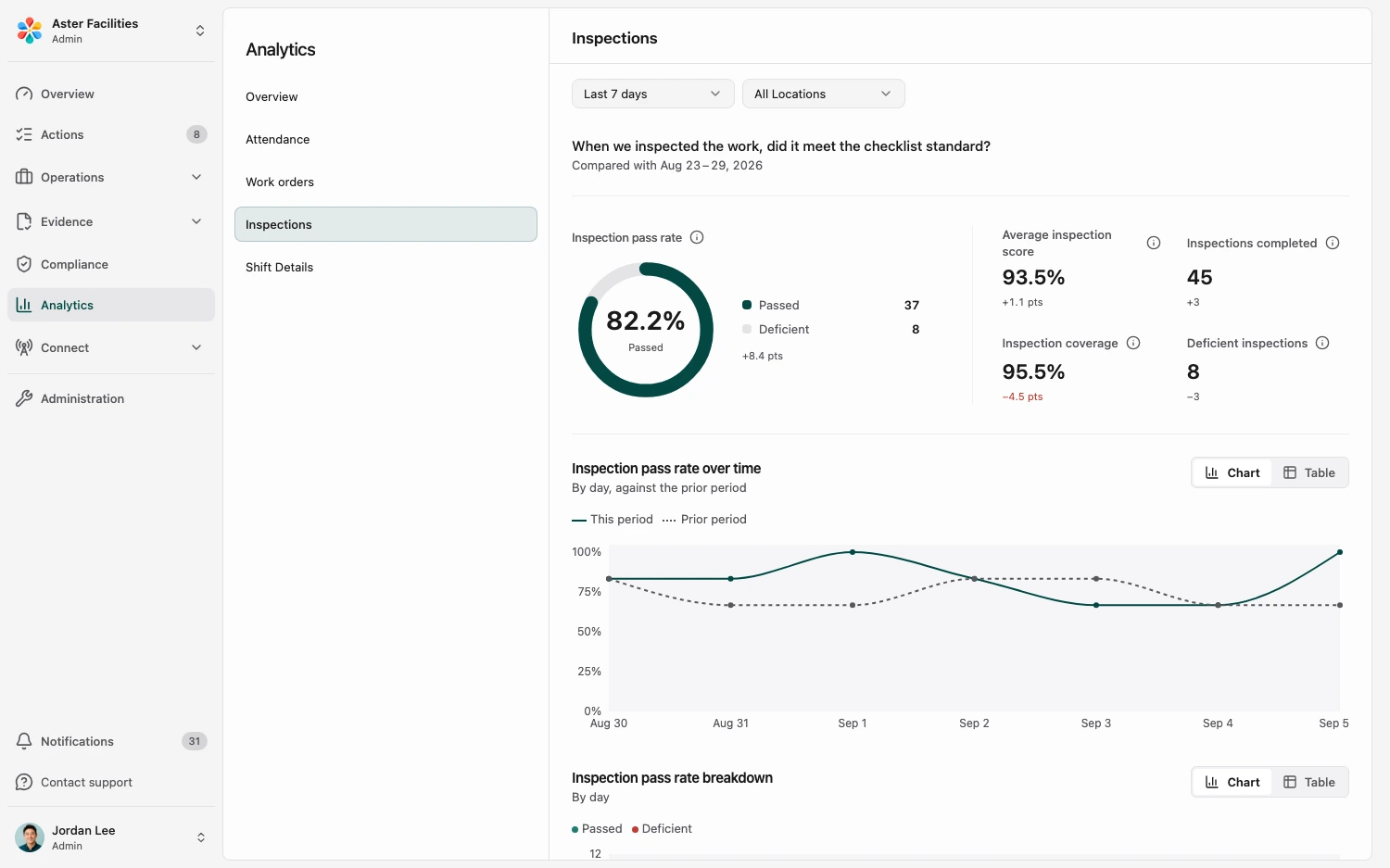
Compare attendance, work orders, and inspection results across sites and over time.
- Where are we falling behind?
- Compare attendance, open work, and inspection results to find the gaps across your sites.
- Which locations need attention?
- See exception counts for every location side by side, and open the ones that need a visit.
- Are changes improving performance?
- Compare results over time to see what changed after a new process or corrective action.
02 · Follow up
Open the records behind the results.
Find a location that is falling behind, then review its work orders and deadlines to see what needs attention.
- Missed deadlines
- Compare work orders that met or missed the agreed service deadline (SLA) at each location.
- Source records
- Open a location to see its work orders, timelines, and resolution status.
- Connected data
- Bring readings from connected sensors and robots into the same view as your team's work with CleanLog Connect.

03 · Your data
Take your data with you.
Use your records in the tools you already trust. All customer data is exportable. No exit fee.
- CSV export
- Timesheets, inspections, work orders, and customer feedback export to CSV. Self-service, no exit fee.
- Work-order API
- Create supported work orders from an external system without duplicates.
- AI assistant access
- Find answers in your records through an approved, read-only AI connection.
- Webhooks
- Send work-order events and Connect alerts to your other systems as they happen.

Full feature list
Everything in Analytics
Operational analytics
Overview dashboard
See which locations need your attention.
Overview dashboard
See which locations need your attention.
What counts as an exception?
No-shows, work orders past or approaching their service deadline, escalated complaints, low inspection scores, understaffed sites, and items waiting for your approval. The overview shows the counts for every location so you see which sites need attention.
Can I see details for a specific location?
Yes. The overview shows the summary. Click into any location to see its individual work orders, timelines, and resolution status.
Do I get notified about exceptions?
Yes. No-shows trigger a push notification. So does a work order that reaches half of its service deadline, so you hear before it is late. You can also review all exceptions in the overview at the start of each day.
Work-order deadlines (SLA)
See what's overdue before the client calls.
Work-order deadlines (SLA)
See what's overdue before the client calls.
Can I track SLA deadlines across multiple locations?
Yes. See open work orders and how long they have been waiting across your locations. Find work approaching or past its agreed service deadline (SLA).
Can I set different SLA deadlines per location?
Yes. Each location sets its own deadline for high, medium, and low priority work orders. The dashboard flags each work order against the deadline of the location it belongs to.
Client portal
Clients see the work, submit requests, and message your team.
Client portal
Clients see the work, submit requests, and message your team.
What do clients get in the portal?
Facility managers see completed inspections with scores and photos, open work orders with their status, and the resolution of each request. They can submit service requests and message your team from the same place. Inspection and compliance reports come from the same records.
What can clients see vs. what stays internal?
Clients see completed inspections, photo evidence, open work orders, and resolution status. Internal data such as labour costs, overtime, and team communications stays private.
Export and integrations
Spreadsheet export
All customer data is exportable. No exit fee.
Spreadsheet export
All customer data is exportable. No exit fee.
What can I export?
All customer data is exportable. Today, timesheets, inspections, work orders, and customer feedback export to CSV.
What if I cannot download a record myself?
Ask us for an export. We will provide the records in a standard or reasonable format while we add more download options.
What does it cost to get my data out?
Nothing. We do not charge an exit fee for self-service exports or requested data handovers.
Work-order API
Create supported work orders from an external system without duplicates.
Work-order API
Create supported work orders from an external system without duplicates.
What can the API do today?
The current external API supports work-order creation with external references, so an FM or service system can hand work to CleanLog without creating the same order twice.
Can I pull every CleanLog record through the API?
Not yet. Broader read access is being added in stages. Tell us which records and workflow you need so we can confirm the available scope.
AI connectors
Let an approved AI assistant read only the records you permit.
AI connectors
Let an approved AI assistant read only the records you permit.
Can I connect an AI assistant?
Yes. Claude, Codex, or another MCP client can read the records you allow through CleanLog's read-only Model Context Protocol (MCP) server. An account admin approves each connection, every call is logged, and access can be revoked at any time.
Where does my data go when I connect one?
The data you authorise is shared with that provider. We disclose exactly what and how in our Privacy Policy, under PDPA Section 26, and you can revoke a connection at any time.
Webhooks
Send evidence events to the systems you already use.
Webhooks
Send evidence events to the systems you already use.
Do you support webhooks?
Yes. Subscribe a URL to work-order events such as created, started, completed, approved, or sent back, and to alerts from connected sensors and robots. Every delivery is signed with a secret you can verify. Set it up in Settings under Integrations.
See the locations that need attention first.
Tell us which questions take too long to answer. See the reports and source records that can help.